How do you measure security?

A perennial type of question that comes up is how to know if you are secure or measure your security.  I have spent some time answering the question here, here, here, here, here, and here.  As you can tell by the multiple ways of asking the same question and the huge differences in opinion expressed in people’s answers, the one underlying trend is that Information Security, as a profession, isn’t in agreement in what we are doing and why we exist.

If you look at my answers, I consistently attempt to define the terms I use and shift the topic onto what I call risk management.  The basic points I make are:

  1. Information Security is misnamed because if fosters the impression that we can somehow be “secure.”
  2. There isn’t any one list of products that you can buy to make you secure.
  3. Any framework that works off the assumption of “security” to generate metrics that measure how “secure” you are is doomed to failure.
  4. A better view is the concept of risk management where risk is objectively measured and managed to acceptable levels.

The reason I consider a risk management framework superior to an Information Security framework boils down to the scientific concept of risk.  The reason I consider this a fundamental requirement in any risk management framework is because it allows for an apples to apples comparison of information risk with other types of business risk.  Since financial and business risk frameworks already use the basic formula of risk as (probability of loss) times (magnitude of loss) annualized. E.g. probable loss aggregated to $10,000/year.  This meaningful metric allows for the ability to make a sound business decision when implementing a new business process.  If the expected profits in the new opportunity are $1 million and the expected annualized loss from all threat vectors – information, financial, opportunity loss, etc. – is $10,000 then it makes sense to proceed with plans in place to absorb the loss.  If the business is comfortable absorbing the loss or can shift the loss to an insurance instrument then I am remiss in recommending a solution that is as “secure” as possible for only $500,000 a year.

I have been fortunate to be exposed to a risk management framework that understands the requirement to objectively measure risk using the basic high level risk metric used by other disciplines.  The framework is called Factored Analysis of Information Risk (FAIR) from a company called Risk Management Insight.

How do you feel Mr. IDS ?

I recently answered this question where the person wanted to get people's opinion on Gartner’s take on Intrusion Detection Systems (IDS).

Gartner says that intrusion detection systems are a costly and ineffective investment that does not add an additional layer of security as promised by vendors. The company recommends that enterprises redirect their security expenditures to firewall vendors that offer both network-level and application-level firewall capabilities in an integrated product … Intrusion detection systems are a market failure, and vendors are now hyping intrusion prevention systems, which have also stalled … Functionality is moving into firewalls, which will perform deep packet inspection for content and malicious traffic blocking, as well as anti-virus activities.

In my response I pointed out that if your ONLY security solution is a list of products from vendors then of course they cannot live up to your expectations.  Here was my response in full:

I guess its time to repeat my mantra "Security is not a product." You cannot buy security because you cannot be secure. All you can do is effectively assess and manage risk.

  1. What does an IDS provide if you don't understand the value and location of your business assets both from the business's perspective and the criminals perspective? Hint: Just because you don't see the value doesn't mean your competitor or the scam artist doesn't.
  2. What does an IDS provide if you don't know all the paths to those assets and the strength of the controls in place to protect them? The door is locked but the window is open syndrome.
  3. What does the IDS provide if no one knows what is normal and what isn't. I am still amazed when server owners want me to review their logs for "Bad stuff" If the owner doesn't know what is normal how do you expect me to?
  4. What does the IDS provide if no one is looking at it? The IDS is a tool. Tools are used by professionals. Why get one without the other?
  5. What does the IDS provide if its in the wrong place? This comes back to understanding ALL the paths to your assets.
  6. What does the IDS provide if your security initiatives are a list of products? Unless dedicated professionals are there helping to identify, assess, and help manage your risks then all your IDS will tell you is how much money is walking out the door in lost opportunities.

Close Source or Open Source?

This is my answer to this question.

Open source is definitely a factor to consider as part of a comprehensive needs assessment. What are you/your client attempting to achieve?
What does their environment already contain?
What impact from a user/maintenance standpoint?
Is there in house expertise to support it?
Does the product meet all the business requirements?
What are the support costs?
Etc.

Any mature implementation plan will treat the licensing requirements - closed or open – as one part of the selection criteria. Once we step back from the closed/open debate and look at licensing in general then the specific clauses in each license matter? Not all closed source licenses are the same, not all open source licenses are the same. Each specific license has requirements and limitations imposed on you – it is these limitations and impositions that must be weighed. Not the Closed/Open label.

Defining INFOSEC

The below excerpt if from this LinkedIn question. I was attempting to point out that we already had the tools and methods we needed to do our jobs if we only took the time to realize what our jobs actually were.

I love the saying "There is nothing new in the world, just different perspectives." INFOSEC is no different. We are grappling with the age old impact of human nature at it's worst. Greed, Malice, Hate, Envy, Spite - age old threats to any human endeavor. I once had a debate with another INFOSEC professional who was arguing that our industry had failed because we weren't *secure* yet. I ask you how can you secure something without changing human nature? After centuries of working on the same issue we still find the need for police, should we say we have failed because there is still crime?
As INFOSEC matures we will realize that we are not something new or special. We are just facing the same dark side of human nature expressed through different tools. Now we can sit here feeling special grappling for new ways to deal with the issue or realize that similarities and apply centuries of progress to the issue and go with what already works.
So what are we to do? First off dump that INFOSEC moniker, there is no such thing as security since there is no such thing as being "secure." All we can do is effectively and efficiently analyze and manage risk. By reducing the opportunities for crime to happen we can reduce the risk of loss. Again, this is a human psychology issue, we have to deter the criminal from bothering us. I refuse to speak in INFOSEC best practices. I view my job as risk management and loss prevention. While it isn't sexy as thinking of my job in sames terms of a security guard, my responses are more effective that way. Now if only that CD drive would hold donuts ....

How should best practices be developed, who should be involved, and how are they shared in a manner that will make them most credible?

My answer to the question was long and rambling.

Your question assumes that these decisions are best made using a top down organization where certain select few experts decide what should and shouldn't be. I am not going to debate that point; I just want to highlight a hidden assumption and offer a different way.
Humans as a species work from a bottom up thought process. We, as social animals, watch and emulate others. We form opinions of others based on our past experiences with them or through a network of trusted opinions of others that we call someone's reputation. When someone who's reputation you respect offers an opinion about a way of doing something you will at least consider it. The idea itself has a certain fitness depending on its ability to solve the problem at hand. The ideas that are the fittest tend to get passed on and those that don't - don't. The fitness of ideas that people recommend operate in a feedback loop effecting the reputations of those that pass them on; those individuals that consistently pass on fit ideas gain a reputation as an expert in their field, etc. Since human society is a scale free network; certain ideas hit a tipping point of acceptance where the aggregate reputation of the individuals passing on the idea out ways any fitness of the idea itself. e.g. the increase to my reputation when I pass on a fit idea is 1 to 1 while the potential decrease to my reputation by passing on an unfit idea is 1 to n where the loss in reputation is diluted among everyone passing on the idea. This effect could be seen in the sayings "No one ever got in trouble recommending IBM" that became "No one ever got in trouble recommending Microsoft."
So what are best practices? They are nothing more than the collection ideas that have exceeded some threshold of saturation in the scale free network of human society. Does that make them good? Sure, they at a minimum survived and out competed the competitor ideas that died off. The whole survival of the fittest thing. Are they the best solution to your specific problems? I wouldn't bet on it.
The answer isn't to decide who should create best practices. The goal is not to base your security program on them. Your program should be based on a sound risk management framework that objectively measures the risk that business decisions have and select the fittest controls to reduce the risk to acceptable levels.
I am a convert to the Factored Analysis of Information Risk (FAIR) framework. Measuring and selecting solutions based on actual needs is always better then playing the keeping up with the neighbors game.
My fundamental point I keep making is that this computer stuff isn't new. All we are doing is continuing the same old human nature with new tools.

Blog restart

Well, after a long absence I plan on restarting this blog. For those of you not using LinkedIn, I have been spending my energy answering people's security questions in their forums. I plan on taking some of the questions and my answers that I found interesting and reposting them here. Stay tuned.

You can't fix stupid

What a great line.

I was watching Comedy Central the other night and heard Ron White utter those perfect words "You can't fix stupid." In one line he summed up why I can spend the rest of my life working in Information Security.

The truth is no matter how smart we think we are we make mistakes. Big ones, small ones, can't believe you had the gall ones. The problem is the people you have trusted with your information all make mistakes;

  • the criminal who jumped the border and is working illegally for $3/hr at the Quiki-Mart,
  • the CEO who thinks skipping commercials is advertising theft,
  • or the music publisher who thinks hacking your computer is the only way to protect their property.

The problem is the people who you trust with your information are focused on protecting their assets not yours.

I believe that it is time for this to change. This information about us that is being freely stored, traded, and sold without our permission is our property. Our intellectual property is worth billions; that is why Identity Theft happens. Criminals only steal what has value. It is time that we demand that business and government recognize that we are the rightful owners of our property and it's improper use is a crime. Businesses that fail to protect our property are just as liable as if they damage our health or homes.

You can't fix stupid; but you can make them pay to put up with it.

The Monoculture Myth

People build models to understand the world.

We sort our world into neat categories to aid in our understanding and decision making. Us vs. Them, Dark vs. Light, Good vs. Bad; used to help us make snap decisions in a hostile world. It is understanding that each of us carry around these mental models that we use to understand and navigate the world that is key; we respond to the world based on the models we see and not the reality in front of us. So choosing the right model for the problem at hand is critical – bad models lead to bad decisions.

Being a new discipline, Information Risk Management grapples with what are the appropriate models to use. As practitioners have joined our ranks from other fields such as Information Technology, Law Enforcement, Medicine, and Military each brought with them models that were tried and true in their old fields and they attempted to apply them to our emerging discipline. Just look at the many names we call ourselves: Information Security, Information Risk Management, Network Security, Systems Security, Security Engineer… In my prior articles – The word on Information Security, Adware and Spyware - are they really consensual?, and Secure at any price? – I consistently show the danger of misusing language to describe the new reality of the Internet Age. The newest example is the term Monoculture when applied to computers.

Monoculture: systems with low diversity.

The paper CyberInsecurity: The Cost of Monopoly is a great example of trying to apply a tried and true model from biology to computer systems. The basic premise is that software has the same vulnerability in a low diversity state as a biological system. A computer virus will attack a dominant system because it is dominant and the impact on society is huge due to the majority of computer systems getting "sick" from the virus. This model has started to grow legs with Massachusetts assaults monoculture and Monocultures and Document formats: Dan’s bomb goes off.

Quick - Go read those articles and see if you can spot the flaws.

Not only are these articles great examples of why misapplying models are dangerous they fail to properly apply the model to the problem they attempt to fix. If monoculture as a model applies then standardizing on any single document format leads to monoculture and the dangers it represents. The articles seem to be championing creation of a monoculture as a solution to a perceived monoculture…

The root issue is whether the monoculture model is appropriate for information systems. Let’s look at the monoculture model in its native discipline – biology. Monocultures are large numbers of a single species in close proximity that we as humans rely upon. The risk being a single vulnerability shared by all members of the species can be exploited by viruses, pests, changes in environment, etc. leaving us without a backup and subject to famine or economic loss. When applied to computers, this idea seems to make sense; Microsoft Windows seems to get a lot of computer viruses because everyone (98% last time I looked) uses Microsoft Windows. This leads people to install Linux or buy a Mac and think they are safe. The problem is in believing that there is such a thing as a computer virus and it acts in the same manner as a biological virus.

Biological viruses are bits of stuff that take over a living cell to replicate copies or procreate. They have evolved through random mutations. Computer viruses in contrast are simply computer programs. They may as part of their operation duplicate or attach themselves to other programs, but in the end they are simple programs created for a specific purpose. They didn’t evolve. They do what their creators want them to do and nothing more. The name "computer virus" is dangerous because it applies the wrong model. By thinking "the virus did it" or "my computer got infected with a virus" the motive behind the action is lost.

The “virus” is evidence of a crime. The real question to ask is “What crime?”

If you believe you are "infected" with a "computer virus" then you get the system cleaned and buy anti-virus software, however, if you realize that a program was installed on your computer without your consent to commit identity theft then you are going to take completely different actions.

In a biological system, the risk is dependant on a single species so monoculture is a valid risk. Misapplying the model to information systems hides the real risks. People break into computers for a reason. Sometimes the reason requires access to large numbers of systems, sometimes just yours is all that matters. The reason the system was compromised was because it was vulnerable – not because it was popular.

Microsoft Windows is insecure by design – not by popularity. Microsoft chose to make Windows easy to use and some of these design decisions or default settings leave the system vulnerable. That being said my children use Windows at home without ever being compromised or needing anti-virus products. If providing basic computer education that a 10 year old can understand can protect Windows then monoculture isn’t the problem.

KIS – Keep It Simple

No matter what industry we work in that model applies. Complexity in design and/or execution leads to increased risk. Computers are vulnerable because they are complex. Linux and Mac are just as vulnerable “out of the box” as Windows all of them have flaws in design or implementation that can be exploited to do you harm. Complexity breeds chaos. This risk was implicitly understood by the early computer scientists and can be found in the The Art of Unix Programming.

  1. Rule of Modularity: Write simple parts connected by clean interfaces.
  2. Rule of Clarity: Clarity is better than cleverness.
  3. Rule of Composition: Design programs to be connected to other programs.
  4. Rule of Separation: Separate policy from mechanism; separate interfaces from engines.
  5. Rule of Simplicity: Design for simplicity; add complexity only where you must.
  6. Rule of Parsimony: Write a big program only when it is clear by demonstration that nothing else will do.
  7. Rule of Transparency: Design for visibility to make inspection and debugging easier.
  8. Rule of Robustness: Robustness is the child of transparency and simplicity.
  9. Rule of Representation: Fold knowledge into data so program logic can be stupid and robust.
  10. Rule of Least Surprise: In interface design, always do the least surprising thing.
  11. Rule of Silence: When a program has nothing surprising to say, it should say nothing.
  12. Rule of Repair: When you must fail, fail noisily and as soon as possible.
  13. Rule of Economy: Programmer time is expensive; conserve it in preference to machine time.
  14. Rule of Generation: Avoid hand-hacking; write programs to write programs when you can.
  15. Rule of Optimization: Prototype before polishing. Get it working before you optimize it.
  16. Rule of Diversity: Distrust all claims for “one true way”.
  17. Rule of Extensibility: Design for the future, because it will be here sooner than you think.

Secure at any price?

I was doing my daily scan of Slashdot this morning when I came across the following article - The Failure of Information Security written by Noam Eppel. Embedded within all that doom and gloom is the following premise - security professionals have failed because our computers and networks are still not “secure.” Noam Eppel has shown us all exactly what is wrong our profession – Noam believes that we can actually achieve security.

Unfortunately, life isn’t that simple.

Secure: free from danger or risk

As every parent knows life is all about risk. No matter how hard you try, no matter what products you buy; your children will still get their share of scrapes, bruises, sniffles, and broken hearts. The wise parent knows that it’s worse to be overprotective than to let the child learn the important lesson behind that bruise – be more careful in the future. Parents understand the fundamental concept that Noam keeps on missing: Life is about living with and managing risk.

“The man who trades freedom for security does not deserve nor will he ever receive either.” -Benjamin Franklin

So as Information Risk Managers our guiding principle is to help our clients manage risk. Do car manufactures make cars that are safe? No. Around 40,000 people die every year in the US in car accidents – yet as a society we have determined that the ability to travel is worth the risk. We as individuals decide every time we get in a car that the reward out ways the risk. Car manufacturers attempt to design cars that are survivable in accidents – they don’t promise that you won’t get hurt.

When consultants sell “security,” clients go about designing applications thinking that the computer and network are “secure” – because security professionals fail to accurately assess and present the risks in basic business language that non-security professionals understand, design decisions that would make the system resilient when exposed to the risk are not made – and then some security professionals choose to blame the business for the "failure".

Web hacks are a great example. How many millions of dollars each year are spent by companies to protect against these “attacks”? How much money was spent by these very same companies to protect their buildings against spray paint? If your web site gets defaced do you really care? Well if you knew the risks up front and designed your web application to protect the customer’s information in spite of the web server being hacked then not really. A simple automated integrity check can trigger a scripted reload of the effected web server kicking out the script kiddy and restoring service – or even redirecting customers to non effected web servers while the reload happens. What can strike fear into the heart of the security consultant more then being replaced by a very small shell script.

Stuff happens. Our job is to help our clients deal with it.

Forensic analysis of Microsoft Hotmail

I was talking with a friend the other day about how malware uses email to hack into computers. What’s malware? Read my previous article: Adware and Spyware – are they really consensual? Anyway, my friend responds back that he uses Hotmail to protect his identity and to avoid malware. Instead of getting into Internet Explorer or Microsoft bashing, I instead chose to focus on his comment of protecting his identity. Used properly, a web email address is great as a spam trap for all the products and web sites that require an email address to register. Create a fictitious web email address and use that as the spam catcher saving your “real” email address for friends and family. Unfortunately, my friend believed that a web email address couldn’t be traced back if used at work or other public computer such as a coffee shop kiosk. I plan to show both my friend and you just how exposed your private emails are.

A forensic analysis of a computer shows everything that exists on the hard drive – files, folders, deleted text and images, etc. The truth is that nothing is ever really deleted only eventually overwritten. The dirty joke you deleted last month can come back to embarrass you tomorrow. Let’s do a hypothetical forensic analysis of a computer where someone accessed a hotmail email account using Internet Explorer.

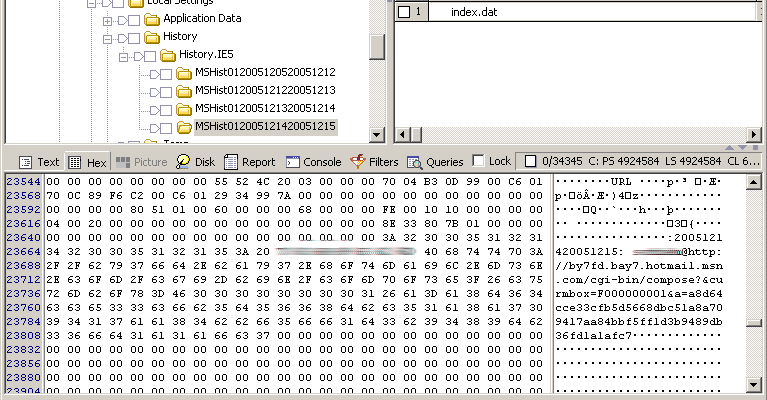
Internet explorer tracks the web actvity of each user in a file named index.dat. If you look at the text in the bottom right panel you will see hotmail.msn.com. Now that we know this user uses hotmail its time to see if there are any old messages to discover.

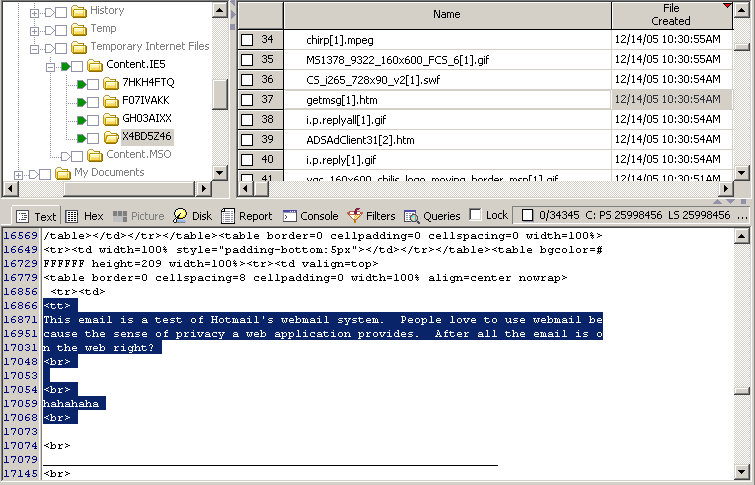
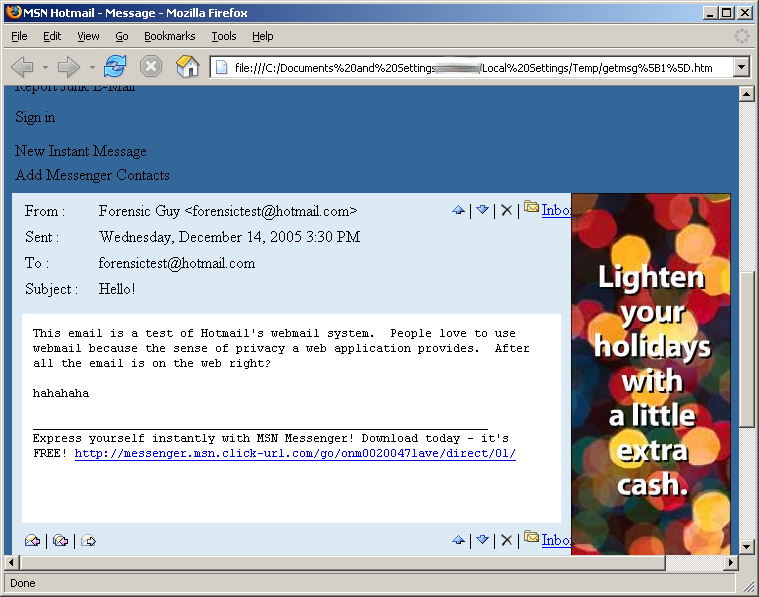
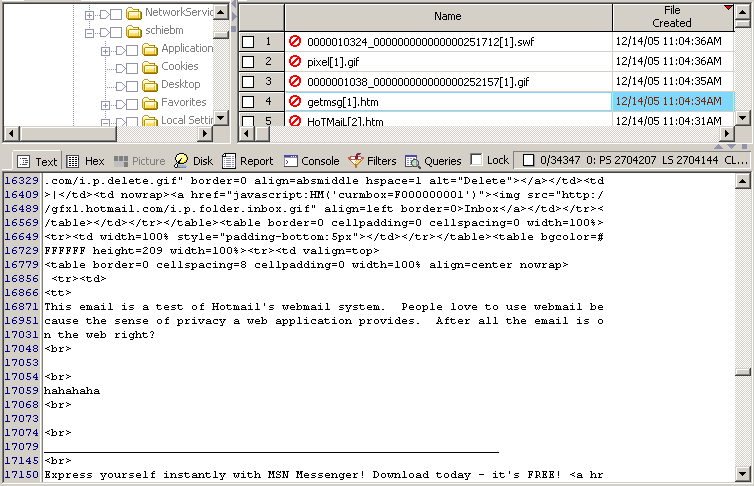
All hotmail emails opened on a system create a file named getmsg[#].htm, where the '#' is an incremented number. So a quick scan for getmsg*.htm finds the first email message. If only we could clean up this ugly html and see the email the same way the user did ...

That’s much better. Hmm I wonder what other messages were in his inbox ...

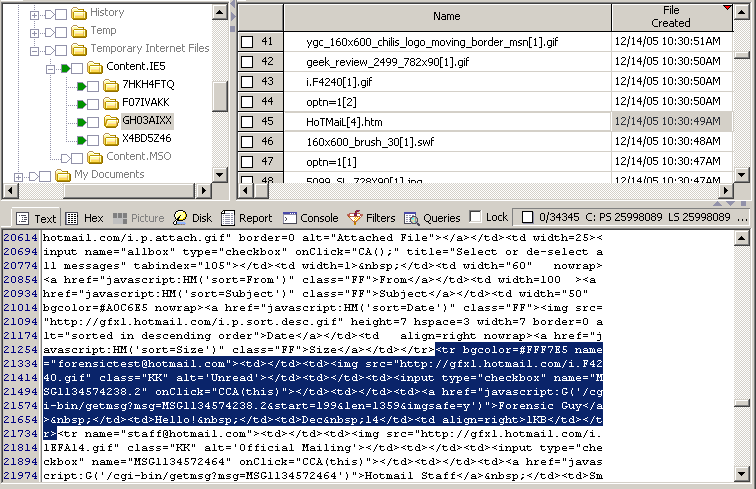
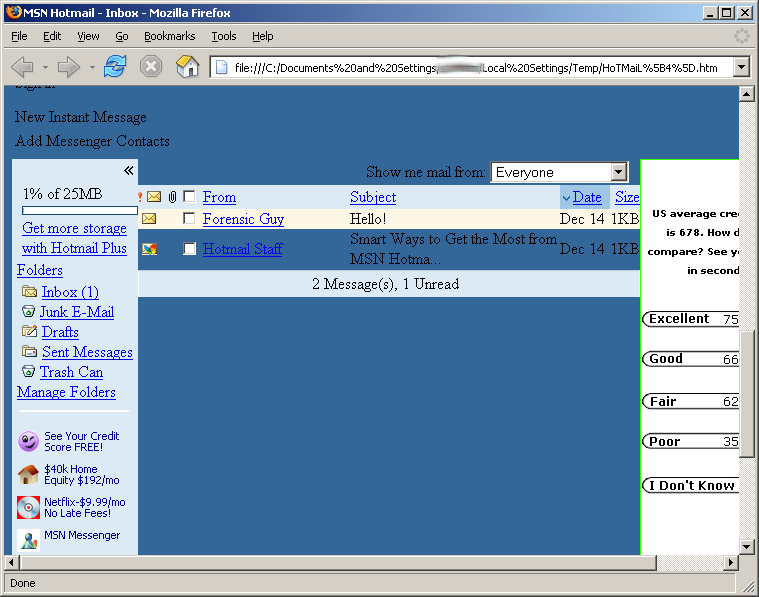
Similar to the getmsg*.htm files, all hotmail inbox web pages are named hotmail[#].htm. A simple search for hotmail*.htm finds another ugly html page. Let’s clean it up a bit.

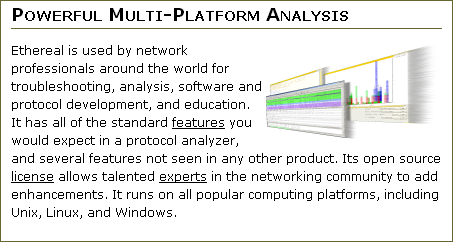
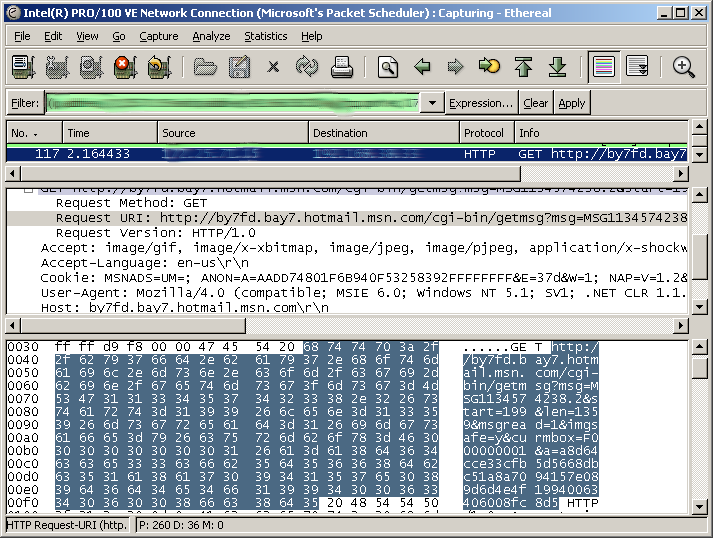
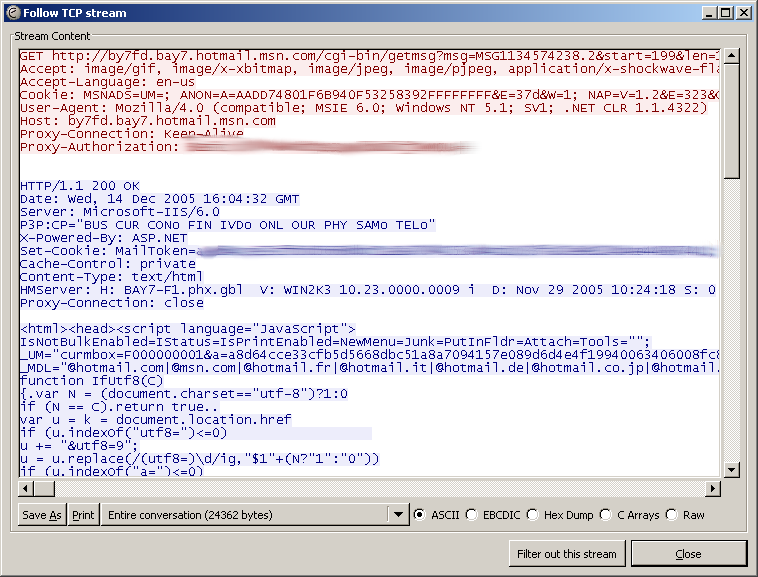
Now we have his entire inbox in all its glory along with all the people who emailed him. I wonder what a search for those names would turn up. Well, maybe some other time. This is just a sample of how exposed web email is to discovery on any system you use to access your email. But wait, there's more! The emails fly across the Internet for all to see. Now I cheated and sniffed the email as it went across the Internet using a tool called Ethereal, which is available for anyone to download and use.

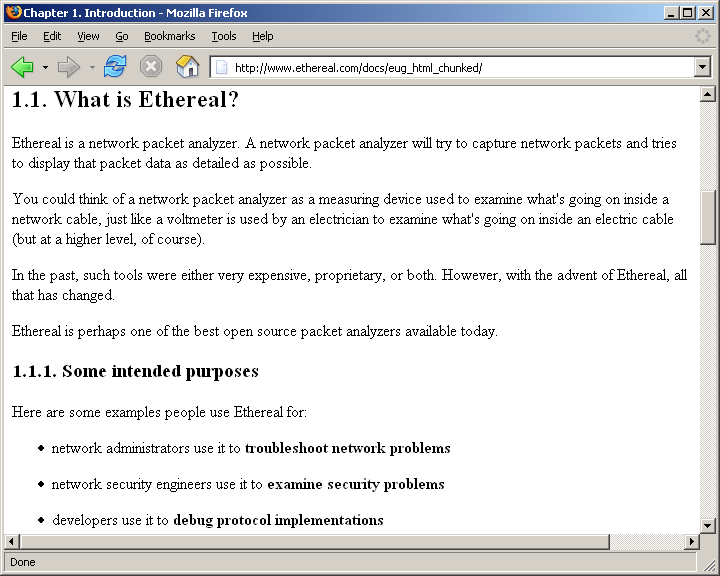
Ethereal is a good example of a protocol analyzer and one of my favorites. It is an open and free to use product with a good community support network that maintains a valuable User’s Guide online.

Getting back to our hypothetical analysis; let’s look at what we captured.

This is what anyone on the Internet *could* see – your coworker in the next office, the weird dude next to you in the coffee shop, anyone. Yes, you probably have to be a geek to understand what this stuff means, however, Ethereal has a feature near and dear to my heart. It’s called “follow TCP stream” that reassembles the network packets into something a human can read.

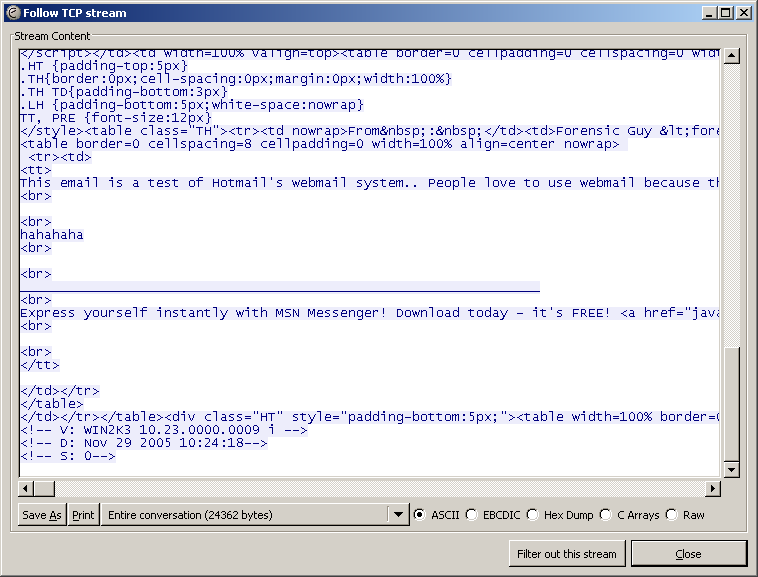
Ok maybe not that screenshot but how about we scroll down some ...

Hey look there is that all so secure and untraceable webmail message! Hmm, I guess my friends and family won’t ever let me borrow their computers again – darn. Now imagine you're in some coffee shop or airport with your wireless Internet connection chatting away and reading your email. Now look over and see the fella just staring at his screen – he looks up and makes eye contact and smiles. Now imagine the above screen shots are on his computer and that’s your email making him smile.

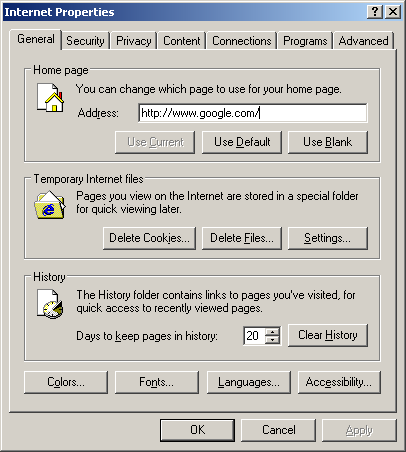
Now I hear you, “I empty my Internet cache! That protects me right?” Wrong.

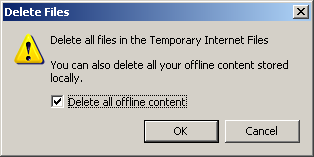
Clearing history …. Deleting files ...

All those files ...

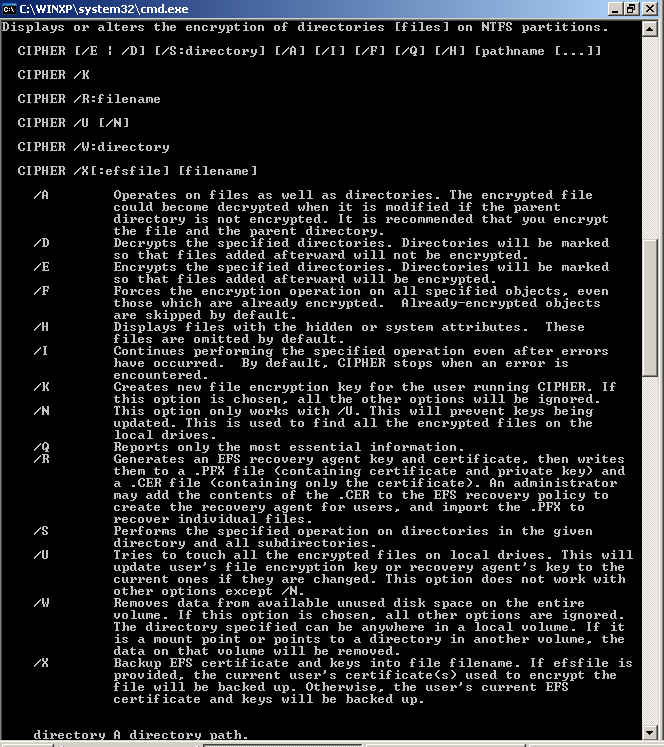
And I can still find them. See the nice red symbol in front of the file name? That means its “deleted”. Remember: Nothing is deleted on a computer - only overwritten. If you're using Microsoft Windows XP then you have some help from a tool called cipher.exe.

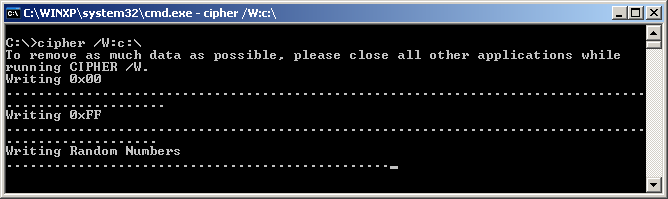
What cipher.exe can do, beyond encrypting your files (see my article Microsoft Encrypted File System – Digital forensic analysis) is to wipe or overwrite all the deleted files on the computer.

After a long while the content of all those deleted emails will be purged and non recoverable.

So is webmail more secure or untraceable that normal email? Depends on what you use it for. If you’re using a fake account to trap spam; the answer is yes. Are you using webmail because it’s available from anywhere? Well, let’s just hope that I’ve scared you off a little. Well till next time - see you at the coffee shop!

Forensic analysis of Microsoft Word documents

Microsoft Word documents are stored in a proprietary binary file format that records additional information, known as metadata, beyond just the text of the document in it. Some of the information contained in the documents that you create and distribute may be embarrassing or private in nature and has shown up in several news stories much to the sources embarrassment. A forensic analysis of these documents can recover this metadata. There are several easy to use tools to discover and clean metadata from Microsoft Word documents.

As several news stories highlight, sharing word documents with others may reveal more then you bargained for such as:

  • Your name
  • Your Initials
  • Your company name
  • Your computer name
  • The name of the server where you saved the file
  • File properties and summary information.
  • Names of previous authors
  • Document revisions
  • Template information
  • Hidden, delete text
  • Editing comments

Knowing the information may be in a document is fine, however, seeing is believing. Let’s create a test Microsoft word document.

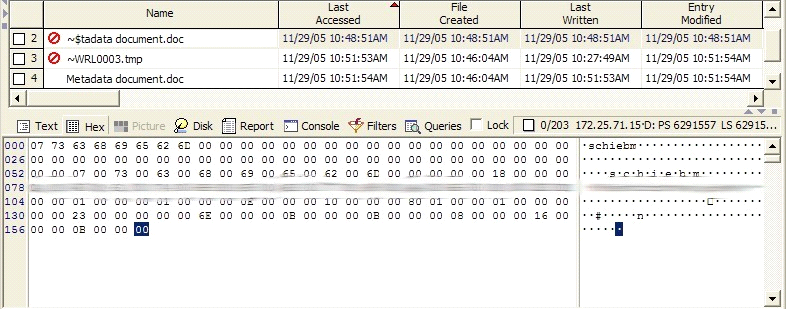
Using EnCase, a commercial forensic analysis program available from Guidance Software, it is possible to see just how messy Word documents are. Notice below that editing the document created three documents. One, ~$tadata document.doc, is the deleted backup file that gets created while a file is being edited. It stores the previous version which as highlighted below was empty.

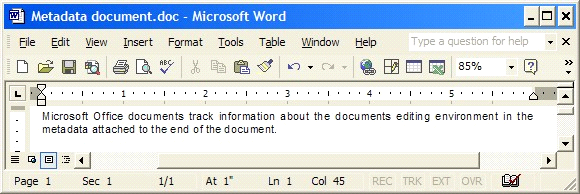
Now let’s edit the document and add some text to discover.

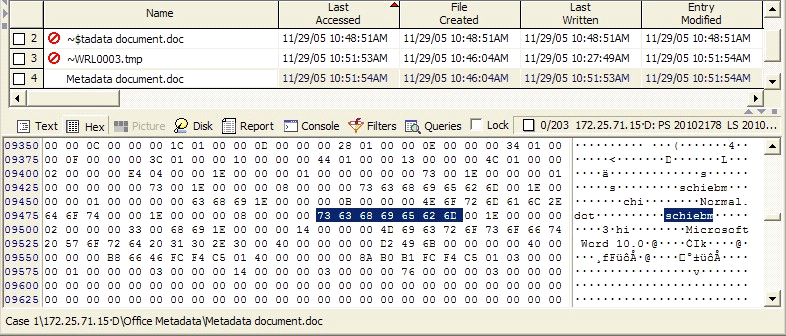
Forensic analysis of the end of the file clearly shows that I was the user that edited the document, that the template I used was Normal.dot, and that I was using Microsoft Word 10.

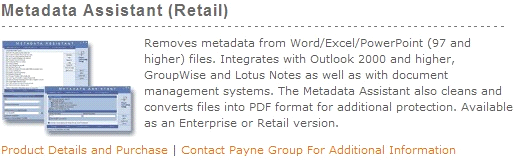
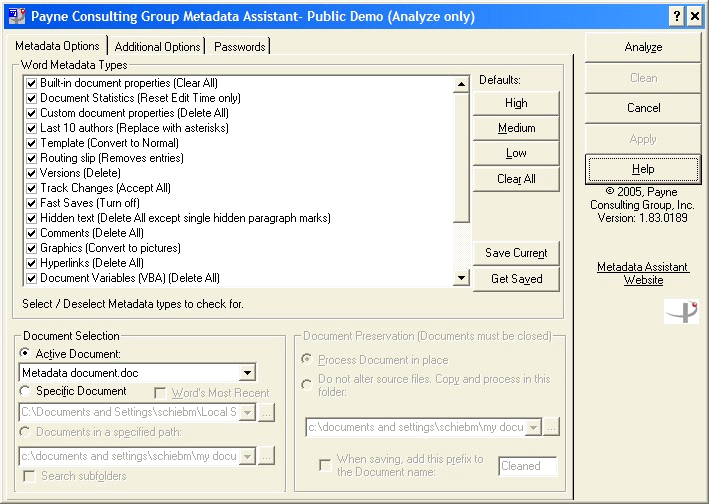
While using a commercial forensic product like EnCase can show the raw metadata, it is much easier to use one of several commercially available products that can show and even remove metadata from Word documents. On such product is Metadata Assistant from Payne Consulting Group.

Using this program anyone can easily discover and clean the metadata from Word and other Microsoft Office documents. Simply start the program, select the document to analyze, and click analyze.

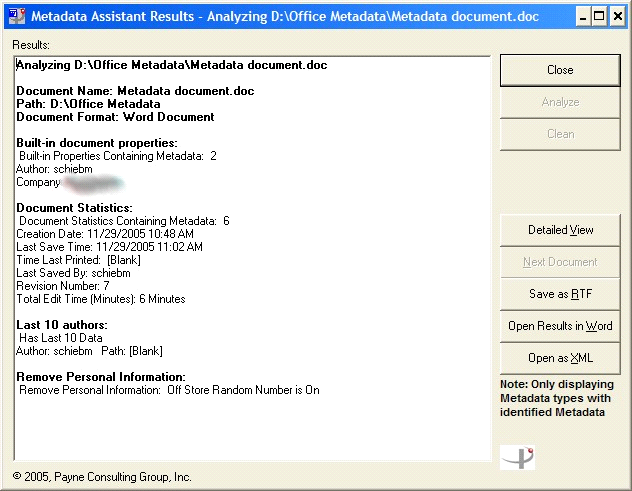
The program will display all the hidden metadata in the document.

If this is a document you are sending to others it is a simple click on clean to save a metadata free version of the document.

Security through obscurity

Protecting your identity online using anonymity

It seems like every week the newspapers are filled with horror stories of people’s identities being stolen, of millions of credit card numbers being stolen, of lives being ruined. People have been buying and selling goods and services literally since the dawn of humankind; so what has changed to cause this sudden massive increase in fraud? How are the purchasing habits of people today creating such opportunities for identity theft? What can we learn from the past to protect ourselves?

Identity Theft

Identity theft is when another person can take unauthorized actions that you become liable for. In modern societies, your identity consists of the documentation that uniquely identifies you. The scope of identity theft can vary from the ability to make unauthorized charges on your credit card, the ability to apply for unemployment, the ability to apply for new credit cards or loans, to the ability to apply for death benefits. The key issue is that making purchases today requires identifying yourself as part of the transaction. The act of identification allows for your information to be stolen and used for unauthorized purchases.

Money

So what is money anyway? It appears that money spontaneously arises in barter economies as society converges on a few key goods that meet the three requirements of money. Any object or token that can act as a store of value, a medium of exchange, and a unit of account may be used by a society as money. In addition to the three requirements, it is desirable that the object or token being used as money be difficult to counterfeit, be easily divisible, be easily transportable, be fungible, and be scarce.

So money is any object or token that people are willing to use to transact an exchange of goods and services. It is the people’s trust in the object or token and not some government’s mandate that determines its value. It all comes down to trust. Money has two forms of trust. Fiat money that is created by government entities for use under threat of force typically has minimal inherent value. The value of the object or token in relation to the goods and services being transferred is determined by the faith people have in the government to act in a rational and ethical manner. Since money must be scarce to have value, the ability for a government to print more money than the nations buying power or Gross Domestic Product (GDP) can support can and often does lead to inflation. Since inflation leads to the devaluation of the object or token representing money, fait money typically fails the requirement that it be a store of value which can be seen in the poor saving rate of the average American. Why own cash (savings) if its value diminishes in time?

If fait money depends on a rational government for its ability to act as a store of value then the only other alternative is commodity money. Commodity money is where the object or token of exchange has its own inherent value. Its value varies in relation to its perceived value verses the perceived value of the object being exchanged. Traditionally gold and silver have met the three requirements of an object to be used as money and have long been seen as a hedge against the vagaries of governments.

Anonymity

Being unknown. Being anonymous means keeping your identity hidden or protected. A strict definition of anonymity means that the parties of each transaction remain unknown to the point that it is impossible to know if two parties have had multiple transactions. An anonymous individual who walks in to a store and buys a pack of gum is only anonymous if there is no way to know if the individual has ever been in that store before. While preferable for some transactions for protection of the individuals involved most transactions prefer Pseudonymity or the use of a pseudonym. The use of a pseudonym allows an individual or an entire group to hide their real identity behind a single pseudonym. Pseudonymity allows for the creation of social networks that protect the true identity of individuals while still allowing for the pseudonym to gain trust through its interactions with others.

The purchase

Now that the basic principles behind identity theft and money have been explored, how does this relate to secure purchasing on the internet? The traditional business transaction since the dawn of humankind has been when two individuals come together in a buy sell arrangement and complete the transaction using a mutually trusted medium of exchange i.e. A person purchases a pack of gum from another person using money. The value of the gum in relation to the money is based on the trust the parties have in the money – not in each other. The purchase price is the relation of the worth of the gum to the perceived worth of the money. At no time does the identity of either party matter because the transaction is based on the perceived worth of the items being exchanged.

The flaw in Internet purchases that leads to identity theft is the fact that money isn’t used. Let’s repeat that. Money isn’t used to purchase products today – credit cards or debit cards are. Credit cards are a promise to pay later using money. Since the seller is only left with a promise of payment, who the buyer is matters. Can they pay? Who are they? Can they be found? Do they have a history of non-payment?

Solutions

Now that the root cause of identity theft has been highlighted, what are the solutions? Either a solution that allows for the creation of a pseudonym to limit identity exposure or a true electronic cash system allowing for anonymous transactions should be used.

A pseudonymous system would be one where the underlying transaction still requires the promise of payment but the trust issue is shifted from the buyer to a trusted third party. An example would be either a prepaid anonymous debit card or a single use credit card number. Either allow for some degree of protection.

A prepaid anonymous debit card becomes a bearer instrument where both parties trust is shifted and limited. The buyer limits exposure to theft and fraud buy determining how much money to entrust to the prepaid card and the seller has the trust in the buyer shifted to trust in the card providing institution.

A single use credit card number leverages an existing promise arrangement with a third party institution into a single transaction. The buyer requests a single use card number tied to an existing credit account for the purchase price of the goods from the seller. The card number is only good for a single transaction up to the requested amount. The buyer then provides the seller with all the information required plus the single use number. This allows the buyer to limit exposure to a predetermined amount. If the card number is stolen in transit the amount of loss is limited to a single one time loss of the requested amount.

While both of these systems – that are in use today – allow for the limited protection from identity theft by minimizing loss from existing credit lines, they don’t protect from the other forms of identity theft. Once enough personal information is disclosed it is possible for third parties to acquire new lines of credit in your name. The only solution is to limit the credit card transactions to trusted businesses.

A true electronic money system is one that meets the three requirements of money. Either the electronic object or token being used as money has a perceived inherent value such as commodity money or acts as fait money where the object or token is backed by a trusted entity. E-gold is an example of a commodity money system where the electronic tokens are backed by a commodity good – gold. The Octopus card is an example of a fait money system. Both systems work and allow anonymous transactions due to the fact that the transaction is base on the exchange of items of perceived equal worth.

"It is well enough that people of the nation do not understand our banking and monetary system, for if they did, I believe there would be a revolution before tomorrow morning."
- Henry Ford

Microsoft Encrypted File System - Digital Forensic Analysis

Overview

Microsoft has provided its customers with the ability to protect their sensitive files using its Encrypting File System (EFS). EFS allows for the transparent encryption and decryption of sensitive files and is billed as a solution to protect documents in the event of the physical compromise of a computer. This article will show that it is possible to forensically recover documents protected with EFS without resorting to breaking its encryption.

What is EFS?

EFS is an additional technology added to Microsoft’s New Technology File System (NTFS) beginning with Microsoft Windows 2000. It allows for the transparent encryption and decryption of protected files with minimal additional effort required by the end user.

Purpose

The purported purpose of EFS is to protect unauthorized access to protected files beyond the protection provided by the standard NTFS file permissions. This means that EFS should protect the document from unauthorized access even in the event that the system is compromised or stolen. The basic line of thinking is that even if you cannot stop unauthorized individuals from gaining access to the file itself; EFS will still protect the contents of the file.

How EFS works

EFS uses a hybrid of both symmetric and asymmetric encryption algorithms. A detailed look at the internals of EFS can be found here.

It is important to note, as the conclusion highlights, that to be able to access the encrypted files each user’s public/private key pair is stored on the local computer in the users profile directory.

What is digital forensic analysis?

Digital forensic analysis also known as computer forensic analysis is the process of examining digital media for evidence. Digital media can consist of:

  • computer hard drives,
  • cell phones,
  • cdroms,
  • floppy disks,
  • USB thumb drives, etc.

Computers only do what they are told and the traces of their activity are left on the computer’s storage areas - cause and effect, actions and evidence. So, analysis of digital media provides evidence of an individual's actions, and when combined with evidence gathered in a large investigation, can show if and how someone lied, cheated or planned out an action. Those who try to hide their actions using encryption only end up showing they felt they had something to hide.

Test plan

So how effective is EFS at keeping protected files away from prying eyes? This test will only focus on how effective EFS is at hiding information. There will not be any attempt to break EFS - just work around it. All encryption can be broken; it’s just a matter of time.

The test plan will consist of:

  1. Create an unencrypted document that we will then encrypt.
  2. Create a document that should be immediately encrypted.
  3. Analyze the hard drive and find the encrypted files.

Create evidence

To make sure that no stray files can cloud the results; the test will include installing all the software to a computer.

Test computer

The test computer will consist of using a 10GB VMWare virtual computer. Microsoft Windows XP and Microsoft Office 2003 are the only software installed that will be installed.

Folder creation

A single user account named "qwerty" will be created and used. The first step is to create a folder named EFS in My Documents.

Next, create two sub folders “encrypted” and “unencrypted”.

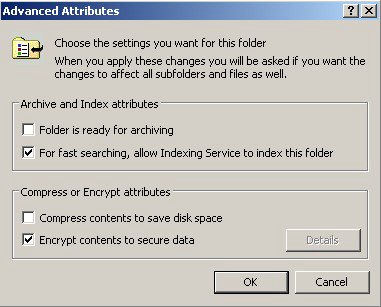
Enable EFS on the “encrypted” folder.

File creation

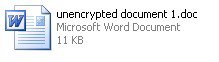
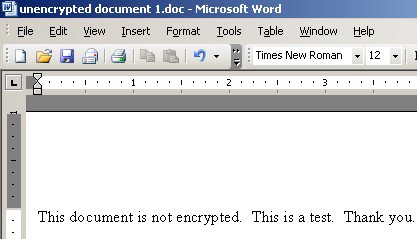
First, create a new word document in the “unencrypted” folder.

Then, add some text to the document.

Repeat the file creation steps in the "encrypted" folder.

Digital forensic analysis

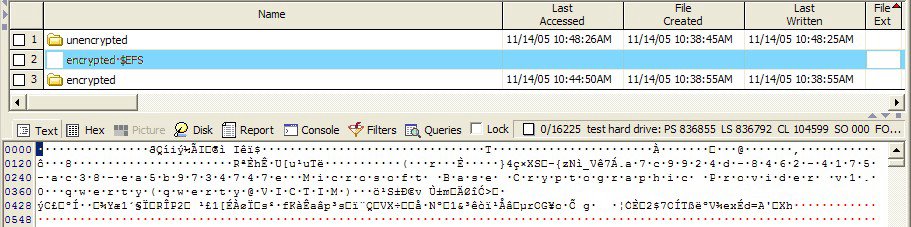
Now that the evidence is created analyze of the hard drive can begin. The first evidence discovered is the alternate data stream $EFS connected to the “encrypted” folder. Note that the bottom of the screenshot shows the content of the alternate data stream. It contains the symmetric key used to encrypt the files that is itself encrypted with the default user account’s (“qwerty@victim”) public key. This can be taken and “cracked” offline.

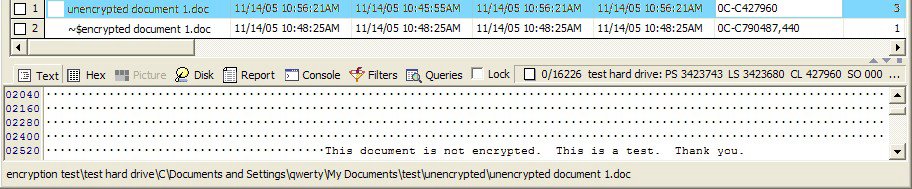
Next the “unencrypted” folder is reviewed. Note the “~$encrypted document1.doc” file. This is the temporary file that Microsoft Word creates when a document is edited. The content of the file is visible at the bottom of the screenshot.

Looking at the “encrypted” folder show the existence of two alternate data streams, each belonging to a word document, note the difference in the bottom of the screenshot where the encrypted document contents are visible but unreadable.

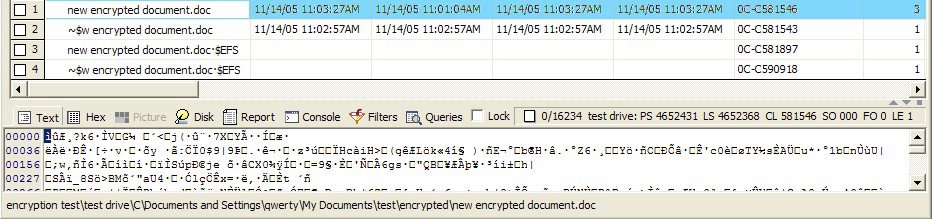
The problem for EFS is when documents move between encrypted and unencrypted areas of a hard drive. The screenshot below shows the result of a file move below. When a file is moved the original location is deleted - but not overwritten - allowing for the recovery of the unencrypted version. Not shown is the fact that portions of protected documents end up in the pagefile in unencrypted form.

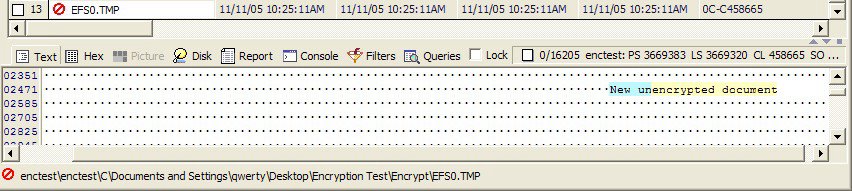
When EFS first encryptes a document, it copies the unencrypted contents to a file called "efs0.tmp" in the current folder. The data is then encrypted, written back to the original file, and then the temp file is deleted. This exposes the last endited file in each folder in a potentialy recoverable state as the screenshot below shows.

Findings

Temporary file issue

Temporary files are deleted but not overwritten allowing for clear text versions of encrypted documents to be found and recovered.

File names

All the file names of documents are left unencrypted. This is by design, however, this allows attackers to focus attentions on files that are named after what an attacker wants such as “2005 banking information.doc”

Key recovery

While beyond the scope of this test; the fact that the encryption keys are on the system allows for the keys to be stolen and broken.

The user problem

Notice that no additional steps were required for a user to use encryption other then selecting a folder to encrypt? Any access by the user allows for the transparent decryption of the files. This reduces the security of EFS to the user’s password.

Conclusion

It is unfortunate that current security follows the sliding scale from hard to use but secure to easy to use but insecure. Microsoft designed EFS to be easy for the average user to use. In so doing, it fails to meet the purpose of encryption – protecting documents from physical access to the computer or digital media. The fact that encryption will be inconsistently applied to user data and the fact that deleted files are not viewable by the end user allows for unencrypted data to remain on the system. The encryption keys also are stored locally putting the encrypted data at risk. The final failing for Microsoft is not recognizing that over 90% of users will disclose there passwords when asked. Social engineering is still the biggest vulnerability to your data – because there is no patch for human stupidity.

Trust no one.

Let's play the finger pointing game

Unless you have been living under a rock for the last few years you’ve probably heard about “Identity Theft” and all the major security breaches of sensitive information. No really good story can exist without your duly elected representatives, the media, and unpaid pundits including yours truly from expressing their biased and largely uneducated opinion on who is to blame. It’s my opinion that if anyone is to blame its you. Of course, I also believe it is not a question of “who” it is a matter of “what”. Like all great social failures no one person or entity caused this mess, the cause is how we do business today.

It's all your fault

The question in front of us is: Why is the preverbal “you” at fault? Because the identity being stolen is our own; we have a choice. We can either own the problem or be the victim. I choose NOT to be the victim and in so choosing I must accept responsibility for dealing with the problem. What's your choice?

In god we trust: All others pay cash.

Back in the day before the Internet, computers, and rampant credit borrowing; Identity Theft wasn’t a major news item. Why was that? What was different then in how we did business compared to today? I can answer that question in one word – cash.

Cash; anonymous, universally accepted, and safe – you could, and still can, walk into any store, pick up the item you want, and put down that cold hard cash. No identity required, no identity given, no identity exposed to be stolen. I want to focus on the “no identity given” part of that sentence. We are calling this major issue “Identity Theft” when in fact we are giving away our identity every time we make a purchase, go to the doctor, or fly in a plane. We then insist – after the fact – that the business or our government secure our identity from harm. This is akin to demanding our government to protect us from dying. Those of us in the business of security know that there is no such thing as being “secure.” The focus is on risk management.

"people willing to trade their freedom for temporary security deserve neither and will lose both"
Benjamin Franklin

What is a good password?

Welcome to the 21st century where the average person has to remember more passwords than family member birthdays. Stop right now and think about just how many passwords you use on a daily basis:

  • ATM pin(s)
  • Credit card pin(s)
  • Work computer(s)
  • Home Computer(s)
  • Email account(s)
  • Online banking account(s)
  • Online shopping store account(s)

The list just keeps growing. In the 21st Century we are what these passwords access so we need to choose really “good” ones. So what is a good password? The short answer is no one knows but you. That doesn’t stop everyone and their son, the computer wiz, from expressing their opinion of what a “good” password is; they just happen to be wrong. I know those are fighting words but stick with me and I’ll show you why.

Access logs – your identity’s credit report

To know what a good password is we must first understand how computer systems are designed to protect passwords. One word - logging. The first step of account access is authentication. This is the step where you present your ID and password to the system to gain access and this information is verified. For our purposes the ID is either the physical card you give the machine or a username you provide. The system checks to see if the password is correct and either lets you in or kicks you out. Either way a properly designed system logs access; the better ones even track multiple failures in a row and either alerts someone or locks out access. This is good right? When was the last time you even looked at your computer’s logs if ever … Does your bank or store advertise the fact they do? Do they at all? Logs are only as good as the amount they are reviewed. Think of them as a credit report, unless you take a peek every once in a while, the first time you detect trouble is too late.

I have people come up to me all the time saying they think they are hacked because they think people are accessing their computer. I could ask how they know, what tipped them off, is something missing, etc. I don’t. The first question I ask is did they review their logs. Only they know when they have accessed their computer because only they know the times and types of activity they didn’t do. If they didn’t log onto their computer at 3 AM and their computer says they did; they will catch it - I won’t. Is there a bunch of log-on failures in the logs? Is there a single one and they didn’t do it? Change your passwords now. Change ALL of them and for bytes sake don’t you use the same one everywhere. Believe it or not you will catch most issues this way without the techie house call required. Just remember this golden rule:

If you have a doubt, change your password NOW and reinstall your system from scratch.

It is easier and far cheaper than bringing in an expert to try and fix the problem. Do you really trust anyone getting paid less then $200 an hour to outsmart a hacker? Just because the Retailmart geek can’t find a problem doesn’t mean there isn’t one. The simple act of putting in that Windows or Linux CD and starting over can stop the best hacker in their tracks, or at least put them back at square one.

The computer crowbar

The Hollywood style of breaking into the computer protected system is a guessing game. We have all seen the sneaky thief/spy/hero/scantly clad woman using a special program to rapidly try password after password until the door opens. It is the computer equivalent of using a crowbar to break the window or pry the door open; it’s noisy and messy – but it works. To see why requires us to stop for a moment and think about what a password really is. A password is a string of letters, numbers, letters, etc. This makes the password a numbers game. How many guesses does it take to get to the center of that tootsie pop?

If you set your password to be “Fido,” how hard is it to guess? Let’s see, the password is 4 characters long so the math is N to the forth power where N is the number of possible letters per character. With 26 letters in the English language the formula becomes:

26 letters lower case + 26 letters upper case = 52 letters per character. (N = 52)
52 to the 4th power = 711,616 possible passwords.

Since the Hollywood program can guess a million passwords a second the scantly clad heroine opens the door in under one second. The simple way to make it harder to guess the password is to both increase the number of possible guesses per character and increase the number of characters in the password:

26 lower case letters +
26 upper case letters +
0-9 digits +
~!@#$%^&*()_+ symbols, 13 of them.

That's 26 + 26 + 10 + 13 = 75 combinations per character with an 8 or more character password meaning 1,001,129,150,390,625 combinations; our heroine may need to order lunch while she waits. The point of all this is that it is noisy. Every guess will be logged and the better systems will be paging geeks left and right or locking the account – If someone actually is looking at the logs. Are you?

The computer lockpick

Of course the above example really only happens in Hollywood. The smart money is to realize that the password is only as good as the owner. People make passwords that they can remember and they tend to use the same one everywhere. For the next example we are going to need a volunteer from the audience. (the sound of crickets chirping) Let’s try again, for the next example we are going to create a fictitious computer user to pick on:

Name: Protagonist Simpleton
Address: 1234 Main Street, Anytown, Ohio, Flyover County.
College: MBA from Ohio State. He is a college football fan to the point of body paint.
Family: Wife Jane, son Billy, and dog Fido.

So this person’s native language is probably English, he likes football and tracks his collage’s team, and he is a family man. A good bet on this person’s password would be words and phrases dealing with these likes, dates of his wife or children, phone numbers, addresses etc. With a little work Googling this person we can build a pretty good list of password possibilities. Don’t forget his mom’s maiden name this nugget is golden – password resets will be a breeze. “I lost my VISA card and I’ve moved can I get you to send me a new one? Sure! What’s your mother’s maiden name?” The point is we have reduced the trillions of guesses down to a few hundred thousand. Jeeze, running the entire English dictionary of words takes less than a second on a modern computer.

The computer pickpocket

By now it should be very obvious why log reviews are important. This next break-in example doesn’t leave any traces … For you to use the password the computer system must know it. That is pretty obvious right? Well, if the system knows your password it must be storing it somewhere and that means that the bad guys can just steal it. A good system will store the password in a form that is not usable in and of itself and it will protect this store of passwords; however, it still makes for a very tempting target. What this does is make your password only as good as the password and controls of the outsourced system administrator or call center employee making $5 a day in India, China, or other 3rd world hell hole. It’s a good thing you use a unique password on every account.

If you are using the Internet to access your account then that password just was sent out for all to see and capture. Hope the system was good enough to secure that transmission. If not the most likely case is the bad guy still has to do the crowbar or lockpick trick on the stolen passwords. The difference is that since they already have the file of encrypted or password hashes I.e. passwords in unusable form they can guess against this file and not leave any log entries to see. The first time they use your password is when they have guessed it correctly in the file.

The savvy citizen

How do you protect against this? Beyond only doing business with companies who have a clue and don’t outsource their security beyond the reach of your countries laws to follow; make your password hard enough to take awhile to guess. The game we all play is the rabbit and the tortoise and we are the rabbit. Each time we change our password we are sprinting ahead of the tortoise with the distance being how hard we made our password. Like the rabbit in the fable, we are resting on the side of the race course while the tortoise keeps on plodding along. The bad guys are guessing away all day and night slowly creeping up on the right password. Using our above example of 8 characters and 1 million guesses per second; it will take AT MOST 31 years to get the password. It isn’t IF the tortoise will catch up – it’s a matter of WHEN. In real life using publicly available programs an 8 character password is guaranteed to be guessed in less than 2 months. So like the rabbit we will loose the race unless we wake up and sprint ahead some more.

As the rabbit, our goal is to stay ahead of the tortoise. We can do that by controlling two things; the distance we sprint each time and how often we sprint. If a public tool can guess the password in 2 months the bad guys can do it in a month. If we use an 8 character password with numbers, letters, capitalization, AND symbols; then we need to sprint ahead by making a new one every month for every account! That’s a lot of sprinting and I’m getting tired of remembering that many new passwords every month. If you look at the math above and plot it the result is an exponential curve with each additional character making the password exponentially harder. I’m not going to graph this myself because the guesses per second are based on the bad guy’s tool and only they know what they are using. Just remember the general principle of longer passwords allow for longer duration between changes.

Does this mean everyone needs to remember dozens of constantly changing hard to remember gobbly gook that isn’t a word? No. The dictionary is made up of a list of single words, by putting words together into a single sentence then you have a very long easy to remember passphrase. The passphrase “Jane Simpleton is the love of my life!” is IMHO easier to remember and much harder to guess than “!h3r32D4y.” Both passwords are completely worthless if they are never changed.

So what is a good password?

A good password is one that you can remember without writing down. A good password is one that you change as often as your current one requires – The longer the password the longer between changes. A good password is one you trust – when in doubt change it!

Adware and Spyware - are they really consensual?

What is this Adware and Spyware stuff anyway?

Adware and Spyware are a class of Malware that some will argue is legal due to the user accepting an end user licensing agreement (EULA.) The basic excuse is that the end user downloaded this really cool game/screensaver/program for free and accepts that the program or another bundled program will make money off the end user in some way. In short, the reason this type of software is legal is because the end user agreed or consented. So what is consent or implied consent and do Adware and Spyware achieve this standard?

To be legal Adware or Spyware must display an agreement sometime during its installation stating at least in general terms what the program does or will do. This display is the EULA that no one ever reads and just clicks "I accept". Now this agreement can state anything that isn't inherently illegal i.e. a contract cannot be created for murder for hire. I'm not going to go into details on all the evils of most EULAs here as there are many other articles on that subject. If you agree to a contract then it's your fault for what happens to you. My focus is on if Adware and Spyware achieves consent and just how strong is this industries house of cards.

Just click - I agree. Come on I dare ya!

So to be legal Adware and Spyware must have had the consent of the end user. Unfortunately, computers are still a relatively new technology and Information Security as a profession still believes their special. Other areas of law have the concept of Informed Consent; that to consent the person must be aware and knowledgeable about the consequences of what can happen. Eventually as computer literate judges enter the workforce Adware and Spyware EULA will be challenged on this concept. In the mean time we must fight these programs on other legal fronts.

Lets get back on the basic premise that the end user has given consent via a click through EULA. Legal consent required:

  1. The EULA was made available to the end user prior to the installation being completed.
  2. The end user accepted the agreement either explicitly by clicking "I accept" or implicitly by continuing to install the program.

3 types of trickery

Adware and Spyware actually come in 3 main flavors of increasing bitterness - Integrated, Bundled, and Trojaned:

  1. Integrated is the most honest of the programs. The Adware or Spyware functionality is built right into the larger program and is usually visible.
  2. Bundled is much more likely to trigger the gag reflex. This refers to a usable free program, here after being referred to as the bait, including a dubious EULA that states other bundled software is required for use. These bundled programs are malicious in nature but still legal at this time do to the consent issue.
  3. Trojaned software may actually be illegal. The general idea is to trick the end user into installing the Adware or Spyware through some third agent. The Adware and Spyware folks try to claim that consent was given due to including a EULA; however, the third agent automates the install and typically hides the display of the EULA. The question now becomes if the EULA isn't displayed and the end user isn't even aware of the existence of the Adware and Spyware, is it still legal?

Types of program distribution or the tough climb to the bottom.

Computer programs are like any other product; the programmer finds a need and then attempts to fulfill it. The problem is that writing programs are about as much work as writing a novel and unless you're already wealthy you need to get paid. So just like the aspiring novelist with book in hand, the programmer sets out to release the program into the world.

The program could be sold through the normal channels of prepackaged store sold goods. Just like the aspiring novelist the programmer has to find and convince a publisher to distribute the work, create all the packaging to distribute the software, and deal with the markup costs in the distribution chain. This is why software costs $50 and up; $10 to the programmer and the rest to Retailmart.

Couldn't find a distributor? How about release it online! Your program or novel is going to be seen by a much larger audience but how do you get paid? How about providing that free taste and then let your customer pay you for the rest ala shareware? The only problem is getting them to pay ...

Can't get your customers to pay? How about giving your program away for free and get paid by a marketing firm to pay you to place ads in your program. Adware isn't that bad, your still liked better than spammers and lawyers. Of course you'll have to rewrite it to display the ads but what's a little work for cold hard cash.

To lazy to rework your own program? Don't worry the Mafiaoso of the world have prepackaged programs that will do the work for you. Just bundle their programs and get paid per install, per add, per identity stolen ... Well you get the point, less work more cash just need to sell your soul; sign right there on the dotted line.

Can't write that American novel or TetrisAttack game? Don't worry! The same people who want you to "bundle" their software don't care how you get their programs installed. Just go out and buy a copy of "Spammers for deadbeats" and annoy the world. For the script kiddies in the audience who need to move out of their parent's basement why not put the wookie costume away and put your leet skilz to work. Script up that virus to do the work for you; you're scum so revel in it!

Surfing at your own risk

Seriously though, I normally don't attempt to stand in the way of anyone making a buck off their hard work. Advertising is actually a good thing because with advertising revenue programmers create programs at a price, even free, that people can afford. The problem is that the current evolution of Adware and Spyware has effectively removed informed consent from the equation. Now I am not talking about all Adware or even Spyware. Advertising that is: visible, integrated into the larger program, and has the fully informed consent of the system owner, is completely fine and even ethical. Even Spyware that meets the above standards could be deemed ethical. I allow individuals to watch me every day as I go about my life; it is when I have not given my permission, obviously attempt to avoid contact, or am tricked into compling that it becomes stalking. The current trend by web advertisers is to provide programs that provide the advertising or tracking functionality to 3rd parties to bundle in their programs. While I am still somewhat willing to give these advertisers the benefit of the doubt, this system is ripe for misuse. What ends up happening is that virus writers sign up for an account with the advertisers and bundle the Adware and Spyware as the viral payload as the following two samples show:
  1. Downloader-AAI
  2. Downloader-VG
There is now a whole class of malware called downloader or multi-dropper thats main effect is to install other programs. The question now becomes, just how innocent are these advertisers? They may be able to claim that they didn't create the malware; they cannot deny that they are profiting from it.

Crossing the line

The questions before the legal community are:
  • Exactly when does an advertiser stop being an innocent bystander and become an accomplice?
  • Where does the burden of proof lie for informed consent when it's proven that consent is being bypassed via malware? Just because a EULA exists doesn't mean that the end user saw it and agreed to it.
Its time we stop calling Adware and Spyware for what it claims to be and call it what it is - Fraudware.

The word on Information Security

Word games

Listed below are two sentences. Read each sentence in turn, close your eyes, and imagine the scene described:
  1. An elderly gentleman waiting patiently.
  2. An old geezer slouching in the corner.
How different were your mental images?
Were they of the same individual?
Who would you want to meet?

It is well known that the words we use have a noticeable effect on how we think and behave. This is generally referred to as marketing, propaganda, or more formally as persuasive writing. Used consciously, these specific word choices aid in conveying the full meaning intended. Compare the following two sentences that describe the same event:

  • The zoo handler was mauled by the mountain lion.
  • The zoo handler was nibbled by the mountain lion.
Of course the next sentence reads “I raised this one since she was a kitten and she always showers me with her affectionate kisses.” Intentionally or not, our word choices add meaning to the information we are attempting to convey. Words have meaning beyond their simple definitions. They have their own histories and double meanings handed down through the ages and we ignore them at our peril.

Let’s play a game.

“A strange game. The only winning move is not to play. How about a nice game of chess?”
- Wargames, 1983

The list below contains a pair of phrases with two possible ways of describing the same action or event. Imagine each event in your mind and think about the different emotional response each phrase evokes. For each pair, determine if your response would be different:

  • Attacker – Criminal
  • Web attack – Vandalism
  • Phishing – Fraud
  • Virus - Vandalism

Welcome to the current state of Information Security. In attempting to grapple with the unattended consequences of the mainstream adoption of a new disruptive technology – computers; we have created an industry specific lexicon of terms to define what we all are tasked to do on a daily basis. Beyond the spouse factor i.e. answering the dreaded “what did you do at work today dear?” question:

“I responded to a spyware outbreak on the corporate LAN and developed a long term risk mitigation strategy.”
Sounds much more impressive than:
“I dealt with a few low budget commodity untrained workers (management) goofing off and told them not to do it again.”
This lexicon of terms allows our industry to communicate about the Internet and the current methods of dealing with the challenges faced. In building this lexicon of terms, we have followed both methods of word invention: we have coined new terms such as the Internet and borrowed other terms such as virus, firewall, and defense in depth. It is my proposition that we have fallen for our own marketing. Let’s talk a bit about how it happened, what its effects have been, and where we can go from here.

Well how did we get here?

Blame it on a college student named Morris and his program that became known as “the Morris worm.” The Morris worm of 1988 had a huge impact to the fledging Internet and acted as a wake up call for securing this great collection of adult oriented graphical content. This sparked the formation of the Computer Emergency Response Team (CERT) by Defense Advanced Research Projects Agency (DARPA) in 1988. DARPA was and is part of the US Department of Defense and as such was greatly influenced by the military lexicon. Fortunately CERT came into existence when people were comparing self replicating code to biological viruses. The use of medical terminology and crisis response (triage) seemed to be a natural fit; this lead to the ideas of containment, virus, inoculation, and quarantine joining our industry lexicon. Those that can - do and then they write about it. It was only natural that our industry gained a split personality of battlefield response and biological foes. History has always belonged to the winners.

Using our battlefield response technique, the early industry pioneers launched Operation Sun Devil in May 1990 as the opening attack on the hacker army. Cities were invaded, children were captured at gun point, and lives were ruined. In the end this cyber-Vietnam changed nothing because there was no vast enemy to conquer. Realizing you can’t invade Detroit Michigan every time some 16 year old learns to program; military style response quickly became unpopular. Just ask Steve Jackson games:

“More than three years later, a federal court awarded damages and attorneys' fees to the game company, ruling that the raid had been careless, illegal, and completely unjustified. Electronic civil-liberties advocates hailed the case as a landmark. It was the first step toward establishing that online speech IS speech, and entitled to Constitutional protection...”
- Electronic Freedom Foundation, http://www.eff.org/legal/cases/SJG/.

Sticks and stone may break my bones ….

But the words we use define us. Our industry lexicon has been defined by the backgrounds of the security pioneers and I believe we have fallen for our own propaganda. We have defined the issues we face in military and medical terms without being faced by a foreign army or contagion. There is no vast army of pimply faced 16 year old hackers charging our defenses or biological weapons of mass destruction hiding inside our web browsers. These terms are not only inaccurate and degrading in and of themselves; they also lead us to find military or medical style solutions to deal these imaginary adversaries. Then we wonder why we seem to be losing … So what are we here for? Let’s start with Information Security.
Information - data: a collection of facts from which conclusions may be drawn; "statistical data" Security - measures taken as a precaution against theft or espionage or sabotage etc.
Or how about Risk Management?
Risk - expose to a chance of loss or damage. Management - the act of managing something.
So in avoiding all industry specific terms, let’s look at what we are actually supposed to be doing. Our job is to:
  1. Protect stuff from bad things
  2. Continually work to make it easier to do step 1.

Honest officer the virus did it …

Ok now we are getting somewhere! Lets look up step one again and dig a little deeper. So we are in the protection racket and we attempt to stop bad things from happening. We also try to reduce the chance that bad things happen. What are these bad things? Is it even a what, could it be who, how, where, or when? Using our current lexicon we protect stuff from: attackers, hackers, crackers, spyware, malware, adware, viruses, worms, terrorists, pirates, warez operators, script kiddies, etc. Take the term malware incident for example:
Malware - programming or files that are developed for the purpose of doing harm. Thus, malware includes computer viruses, worms, and Trojan horses.
Incident - an undesired event which under slightly different circumstances could result in harm to people, damage to property, loss to process, or harm to the environment.
So we diligently develop response plans to deal with malware incidents or “outbreaks” and track for trend analysis malware as a category, possibly with sub categories of spyware, adware, virus, etc. Can you see how the military and medical basis of our lexicon has come to haunt us? How valuable is our trend analysis? Can it be used to predict future events? Is all malware created equal? Should we define some global severity to malware incidents? What is an incident anyway? Is it a crime, accident, or random event? Again, our job is to protect.
Protect - shield from danger, injury, destruction, or damage.
So if our #1 goal is to protect stuff, then does the category malware incident work? Let’s replace the word "malware" with "guns" and look at a current headline:
Microsoft to protect users against malware with Windows OneCare.
Gets changed to:
Microsoft to protect users against guns with Windows OneCare.

Who’s on first

The obvious question becomes shouldn’t we protect our users from the bad person holding the gun? The problem is that the use of the term malware removes the source of the incident - the individual(s) who caused the incident. Malware is a program and a program is nothing more than instructions that a computer follows. It exists to serve the purpose of its creator. Is “virus” even the appropriate word? The current leading science theory states that a biological virus is a random result of evolution, unless used in a weapon of mass destruction, that has no intent. A computer virus has a creator who has a definite purpose. There is intent and that intent matters. By combining all replicating code incidents into a single category called “virus,” we lose the ability to measure the threat landscape. Our categories must be based on intent to allow the understanding of the current threat landscape.

When faced with a new technology we assume that we need new tools, terminology, and techniques to deal with it. This has been our failure. Our terminology assumed that a new tool somehow changed human behavior when in fact we are dealing with the same old greed, malice, envy, and violence. The answer is so simple and obvious we missed it. Computers are just a tool that allows the same old human nature to be expressed more efficiently. So our job is to protect stuff from crime committed by criminals. To move forward as a profession, Information Security needs to define its terms with a firm foundation that captures human intent.